Framezone vs separate apps
Five apps, or one view.
The usual setup is a to-do app, a habit tracker, a budgeting app, a workout log and a reading list. Each one is good at its job. None of them knows about the others, so the picture of your week only exists in your head.
Last reviewed September 2026. Prices in USD.
The short answer
Two good tools for different jobs.
Choose Framezone if
- You juggle three or more apps to keep track of your life
- You pay several subscriptions just for tracking
- You want one weekly review and one AI connection instead of five
Choose separate apps if
- You need the deepest tool in one area, like envelope budgeting or barcode food scanning
- You rely on native apps with widgets, watch apps and offline use
- You are happy with your apps and never miss a link between them
You don't have to switch everything. Keep the one specialist app you love and let Framezone cover the rest.
Side by side
Feature by feature.
What each one does out of the box, without templates or add-ons.
What's different
Where Framezone goes further.
One view
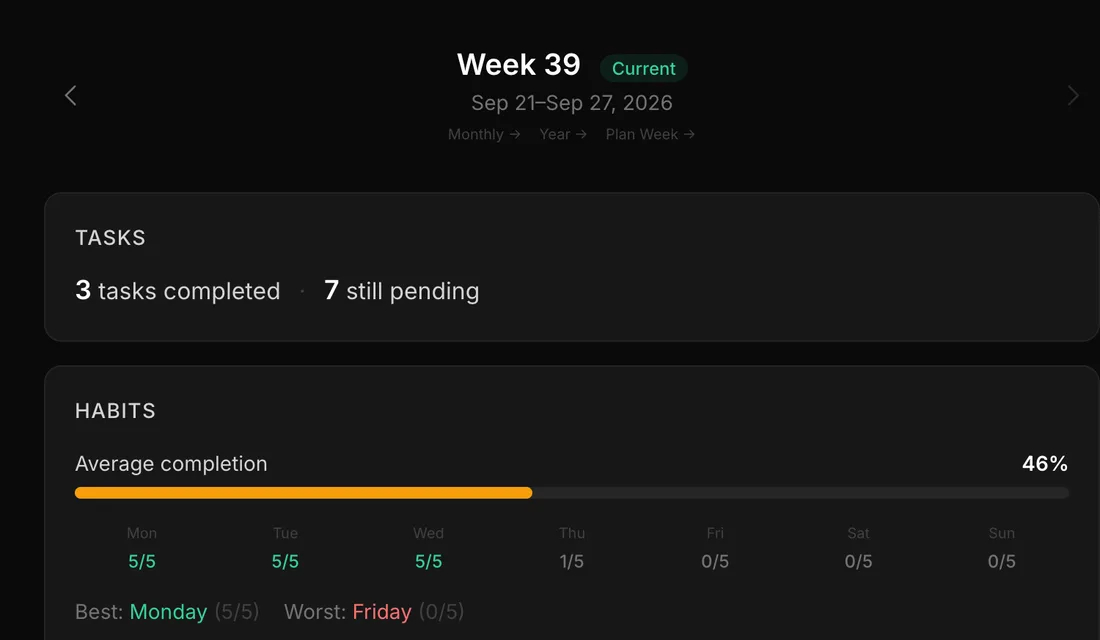
The whole week on one screen
The weekly review shows tasks done, habit completion by day and focus time together. With separate apps, that picture takes five screens and a good memory.
- Weekly, monthly and annual reviews
- Filled in from your own data
- Plan next week from the same place
Linked
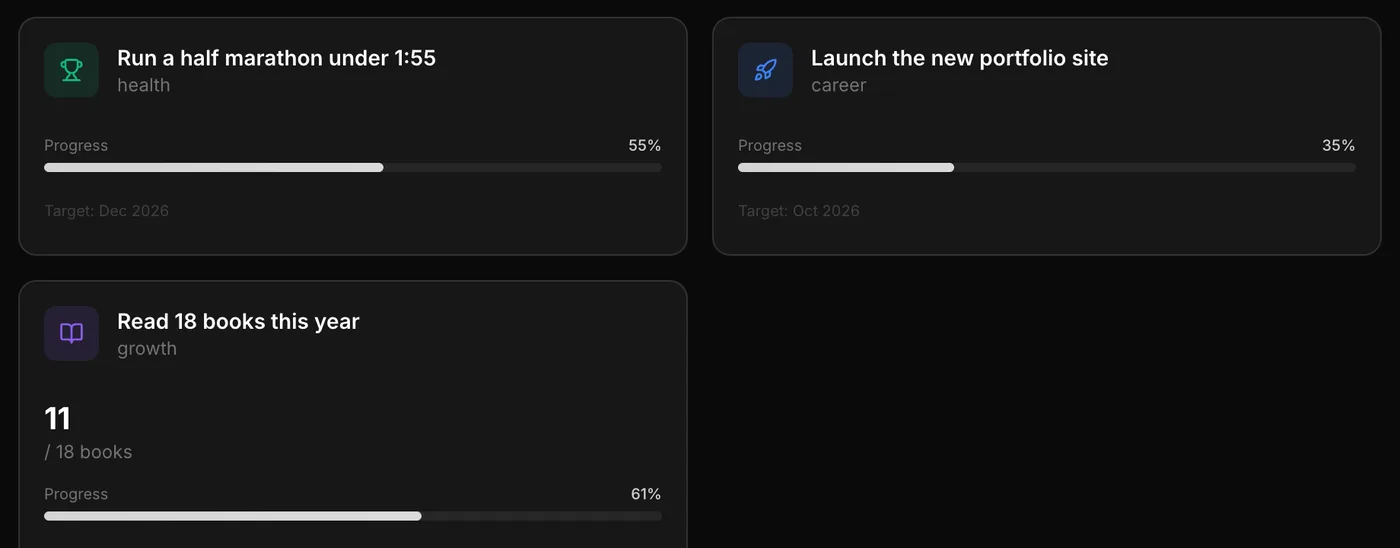
Habits that move goals
Link a daily run to a half marathon goal, or a reading habit to a yearly book target. Progress shows up where you look for it, with no copying between apps.
- Milestone and numeric goals
- Linked to habits and projects
- Progress without extra bookkeeping
AI assistants
Ask one question across everything
With one MCP connection, your assistant can look at spending, workouts and habits in the same answer. With five apps, it sees five separate pieces, if it can reach them at all.
- 62 tools across every area
- Works with Claude, ChatGPT, Cursor and more
- You approve every permission
Did I spend more on takeaway in the weeks I skipped the gym?
An example: your assistant reads transactions and workouts from the same account.
In fairness
Where separate apps are the better pick.
Depth
A dedicated budgeting app has envelope rules; a dedicated food app has barcode scanning and a huge food database.
Native apps
Widgets, watch apps and offline use. Framezone is an installable web app for now.
Maturity
Many specialist apps have years of polish and big teams. Framezone is young and made by one person.
Easy to swap
If one app stops working for you, you replace just that one.
Trying it
One area at a time.
Don't move everything at once. Replace one app, and keep the others until you stop missing them.
- 01 Pick the app you open least; that area gains the most.
- 02 Connect your AI assistant, so adding things takes one sentence instead of a form.
- 03 Run one weekly review with everything in it.
- 04 Cancel a subscription only when you haven't opened that app for a month.
Questions
Good to know.
It covers the core of a to-do app, habit tracker, budgeting app, workout log and reading tracker. If you rely on something specialist, like barcode food scanning, keep that app and use Framezone for the rest.
Contacts import from a vCard file. Everything else starts fresh, or you paste lists to your AI assistant.
You can export everything as CSV or JSON at any time from settings, so your data is never locked in.
There is a Free plan with every module and limits on active habits, goals, projects and accounts. Pro removes the limits for $9 a month or $90 a year, and the first 100 founding members can pay $99 once. Everyone who signs up during early access gets their first year of Pro free.
More comparisons
Weighing something else?
Try it next to what you use now.
Free during early access. Start with one area and keep your other tools until you don't need them.
Free during early access. No card needed.